(Administrator login)
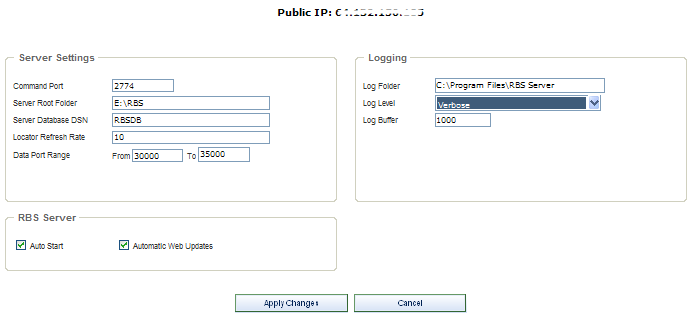
The Properties screen is used during initial setup of the RBS Server. These settings can be changed here, but they are usually initially set up in the RBS Server's installation using the RBS Manager console application rather than in this PlugIn's installation. See the RBS Server's documentation for more information.
Changing any of these settings requires rebooting the RBS Server software.
Public IP - Your RBS Server's public IP address is displayed at the top of the screen.
Command Port - The RBS Server requires a Command Port and multiple Data Ports. The default is 2774, a port number registered to RBS by IANA, the Internet authority that controls top level domains and number assignments. This port number should not be changed after you have distributed Client software, unless you re-install the Client software with the new port number.
Server Root Folder - The default root folder for the Data area. All new users' backup files will be placed here. Changing this folder after users have already done backups will not move their data. This will only establish a new root folder for all subsequent new users.
Server Database DSN - The Database DSN for the RBS Server's main database.
Locator Refresh Rate - The number of minutes between updates of the Server Locator. Normally do not change this. The minimum is ten minutes.
Data Port Range - This is the range of data ports that will be assigned to Clients when they contact the Server for backups and restores.
For maximum speed under most conditions the data port range should include three ports per simultaneous user. The default is the range of ports that begins at 29001 and ends at 29100
After you restrict the port range you can open only that range of ports through your firewall, if necessary.
Reducing the number of available ports too much can result in slow transfer speeds.
Changing the Data Port range is a Server-side operation only. It is not necessary to redistribute Client software if you change the Data Port range.
For more information on how to use Ports and how to configure routers and firewalls, see the Knowledge Base on the remote-backup.com website.
Log Folder - This is the folder in which to maintain the Server logs.
Log Level - Set to Standard, Detailed, or Verbose for increasing levels of logging. Normally set to Standard.
Log Buffer - the number of lines to buffer the Server log in RAM, normally 1000. The buffer will be flushed to the logs after this number of entries has been accumulated in memory.
Auto Start - Normally selected, this turns on the RBS Manager's failsafe monitoring system, which monitors the RBS Server's health and restarts it if necessary.
Automatic Web Updates - Checks with the RBS Upgrades Server daily to see if a software update is available. If it is, a message will pop up without interrupting the Server's operation.
Apply Changes Button - Click this button to apply your changes.